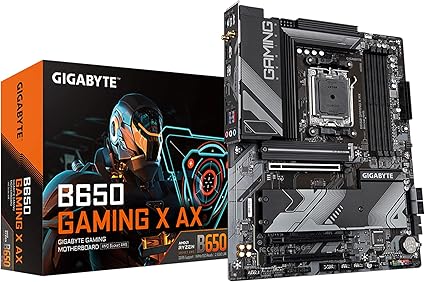
GIGABYTE B650 Gaming X AX V2 (rev. 1.0) AM5 LGA 1718 AMD B650 ATX DDR5, Triple M.2, PCIe 5.0, USB 3.2 Gen2x2 Type-C, AMD Wi-Fi 6E, Realtek 2.5GbE LAN
Buyers photos 0
Dynamics of prices

Want to know when the price of this product will come down? Click "Follow the price" and we'll let you know!
Characteristics
Description
AMD AM5 Socket: Supports AMD Ryzen 7000 Series Processors DDR5 Compatible: 4*SMD DIMMs with AMD EXPO & Intel XMP Memory Module Support Unparalleled Performance: Direct 8+2+2 Phases Digital VRM Solution Advanced Thermal Design & M.2 Thermal Guard: To Ensure VRM Power Stability & M.2 SSD Performance Stable Connectivity: 1*PCIe 5.0 x4 + 2*PCIe 4.0 x4 M.2, USB 3.2 Gen 2x2 Type-C
Product reviews 3
Buyers photos 0

Amazon Customer
Pretty good. Everything works as intended, and the bios is easy to work in. Great mobo for the price
JOSHUA
AM5 boards had a rough introduction, but now that it's later in the Zen 4 cycle it's pretty safe to say the early teething problems are solved. I am delighted by how totally solid and feature-laden this board is, and it proves why I've been buying Gigabyte boards over and over again for decades without regret. The whole thing is just slathered in thoughtful design that makes perfect sense.There's one full PCIe x16 slot, with all channels available. The other slots can fit a full x16 board (like if you wanted to add more video cards or a Tesla card or something), but the lanes will be automatically bifurcated as you do so.There are four memory slots and the board can accommodate up to 128GB of memory. Be aware, however, that Zen 4 memory controllers have some limitations of how fast they can go when you start filling up more memory channels. You can run two slots at 6000 MT/s, no problem — and it's easy to hop into the BIOS and enable that — but when you populate another two slots... things are going to slow down. Even the massively overpowered 7900-series is likely to only be able to run all 4 slots at 3600MT/s. Maybe 4800 if you're lucky, but don't count on it.There are THREE, count em, THREE, M.2 NVMe slots for storage. The first two, upper ones, are faster and connected to more of the PCIe lanes. The third one, should you choose to use it, is slower, and only has 2 lanes available to it. If you're planning to add a big-ass but inexpensive lower spec SSD, put it in the lower slot and reserve the upper slots for your main disks.The CPU slot comes with a bracket, and it's fine for most standard coolers. If you're using a tower type cooler like a Noctua chromax, you'll have to change out the bracket. It's easy to do, just a few screws on the back of the board.The CPU power plug, like almost every board, is in the annoyingly inconvenient spot in the upper left. Remember to hook it up before you screw the board in, so you don't have to try to jam your hand into the worst possible place in the case. The ATX main board power is along the upper edge and a little easier to get to.Speaking of plugs, this thing is just FESTOONED with front and back panel plugs. I'm an avid user of front panel stuff, and I was very happy to see how generous the front panel plug situation is. Of course, the usual old-school front panel controls—power, reset, lights—are the old school annoying single-Dupont jumper wire type. They're as annoying as ever to hook up, and along the lower edge. However, they are clearly labeled, silkscreened, and even color-coded.About that back panel, though: I don't care about WiFi on a stationary desktop. The Ethernet plug is *right there* on the back panel. But I do want to use the Bluetooth. However, in order to use this board's Bluetooth capabilities, you have to hook up the antenna thing. I'm happy to report that while I didn't really *want* to do this, it was easy to do—just two of those micro coaxial cables—and the antenna even has a magnetic base to keep it from flopping all over the place. The Bluetooth works great, and that's kind of a miracle. Most Bluetooth chips are terrible.Remember how I mentioned the BIOS is easy to set up? It's also incredibly deep. You can get down and dirty, with a level of granularity and setting that is just beautiful. This is, truly, a top-tier overclocker's board. But even if you aren't going to get into that, you want to pop in there and do a couple of things:First, update the BIOS. Usually, it's not worth bothering to do this. 99% of BIOS updates in the world don't fix anything for anyone or are only for specific weird configurations. In this case, it's not true. YOU WANT TO UPDATE. In the AM5 world, BIOS updates come with real, useful, upgrades to performance and stability that everyday users can enjoy, and this board needs the new one. Why? The new one makes it faster, literally just faster and better, when you use DDR5-6000 or more.Second, set the "EXPO 1" profile for your memory. The default is kind of a "safe mode" thing which works, but totally wastes the actual speed of the memory you bought.Third, set Precision Boost Overdrive to "80 Level 2". Unless you bought a CPU cooler upgrade, then set it to "90 Level 2." The first number is the target temp it's going to run, and the second number is how much it will reduce the voltage of your CPU. "2" is pretty much the guaranteed recommended setup.Now, reboot and enjoy your AWESOME new Gigabyte board.
Kevin A.
⭐️⭐️⭐️⭐️⭐️ Solid AM5 Board – Great Value, No RegretsI’ve been building PCs for over 15 years, and this board is hands down one of the best value AM5 options out there right now. Running it with a Ryzen 7600X and DDR5-6000 RAM, and it’s been rock solid since day one.✅ What I Like:BIOS setup is clean and pretty easy to navigate—even has Q-Flash for updating without a CPU installed.Wi-Fi 6E 2.5Gb LAN means I didn’t have to pick between speed and stability. Both have been flawless.Plenty of USB ports, including that Gen2x2 Type-C which is a nice touch.M.2 slots run cool—I’m using one PCIe 4.0 NVMe as my boot drive and another for games. Speeds are on point.No weird coil whine or instability, even after long gaming sessions or stress testing.🔧 Setup Tips:Make sure you update the BIOS right away to unlock EXPO profiles and fix early AM5 bugs. Mine shipped with an older version.It supports DOCP/EXPO for DDR5 tuning. I was able to hit 6000MHz with CL30 no problem.Use a good airflow case—the VRMs are capable, but they do get warm under load.Minor Cons (not dealbreakers):Only supports PCIe 4.0, not 5.0 for GPU. For me, no big deal—current GPUs barely touch the limits of 4.0.No debug code LED, just a couple indicator lights. If you troubleshoot often, just be aware.🧠 Final Thoughts:If you’re looking to jump into the AM5 platform without paying a premium for X670 or unnecessary features, this is the board. Stable, full-featured, and GIGABYTE has been great with BIOS updates. I’d buy this again in a heartbeat for a mid-high end build.Would recommend this to any DIY builder looking for a no-nonsense, future-proof-ish AM5 board without spending a fortune.
Similar products