

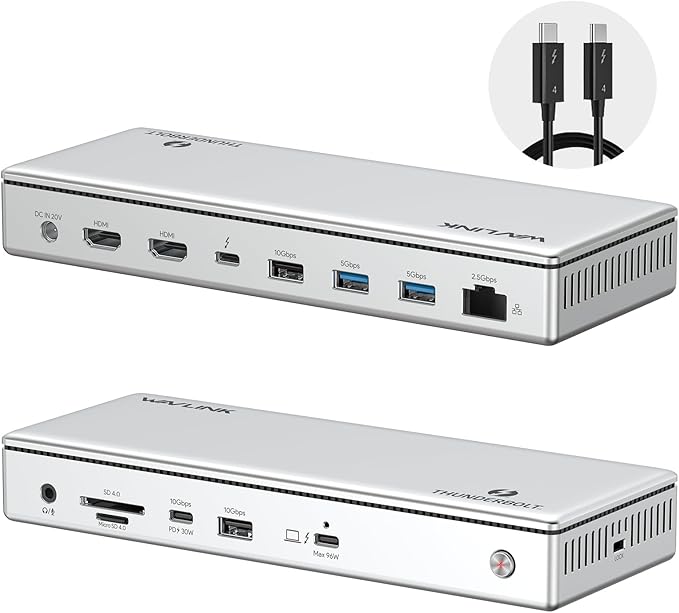


WAVLINK Thunderbolt 4 Hub with Dual HDMI 4K@60Hz,100W Charging, Thunderbolt Certified, 13-in-1 Thunderbolt 4 Dock Dual Monitor Single 8K Output for Windows or Mac, 4X USB, 2.5G Ethernet,SD/MicroSD
Фото покупателей 2

Динамика цены

Хотите узнать когда цена на этот товар снизится? Нажмите «Следить за ценой» и мы сообщим вам!
Характеристики
Описание
Thunderbolt 4 certified dock with dual 4K 60Hz HDMI, Single 8K and up to 96W power delivery to host, true 40 Gbps Thunderbolt 4 upstream and downstream ports, SD/MicroSD V4.0 card reader, 2.5G Ethernet Port backward compatible with 10/100/1000Mbps, Audio and laptop charging all in this dock Video output via HDMI ports: The Thunderbolt 4 Docking Station can extend two 4K@60Hz displays or a single 8K@60Hz display on Windows laptops; Display support by downstream Thunderbolt 4 Port: Up to 8K@60Hz or 4K@120Hz via a native Thunderbolt 4 display or other display that supports USB-C connections and DisplayPort 1.4; Please note for mac users, this dock only mirror 2 monitors via the 2 HDMI ports on M1 Pro/Max, M2 Pro/Max, M3 Pro/Max and M4/Pro/Max, If you want to extend 2 monitors on M1 Pro/Max, M2 Pro/Max, M3 Pro/Max and M4/Pro/Max, you need to select one HDMI output and the other via downstream Thunderbolt 4 port. Base M1, M2, or M3 Macs only support a single display. The Thunderbolt 4 dock is compatible with a computer that has a Thunderbolt 4 port or USB4 port that is running Windows 10 or later or macOS 11 or later 96W Power Charging to host: This Thunderbolt 4 dock comes with a 160W power adapter can charge your laptop up to 96W while working Lightning-Fast Data Transfer: Equipped SD/MicroSD V4.0 card reader with 312MB/s for 3 times faster than SD V3.0; 2.5G Etherent port for higher speed wired Ethernet connection, ahead of peers dock that only equipped Gigabit Ethernet port
Отзывы о товаре 5
Фото покупателей 2

MorganG
This seems like a reasonable docking station at first glance, and is one of the best-priced stations out there for TB4. I purchased it to replace an older docking station that had stopped working. I wanted dual display support, audio, plenty of USB ports, and thunderbolt out so I could daisy chain them.Before purchasing I studied the documentation carefully, and there was some seemingly conflicting information about Mac dual display support. The FAQ section says dual display is possible for M1 Pro (but not for M1), and I have an M1 Pro chip. The brochure part of the description says that for Mac, the only possibility for two HDMI displays is mirroring.It turns out the brochure, not the FAQ, is right. Worse, the mirrored display defaults resolution to the "lowest common denominator" display (the smaller display), making it entirely useless. In the MacOS settings app, when two displays are connected to the built in HDMI, only one display is listed there. I can get it to display separately on two displays only if I have a separate USB3->HDMI dongle, but then, what's the point of having "dual HDMI?" It just seems like a really poor design. And this is NOT a limitation of the Mac or macOS, because it works fine with a different docking station I've used.I will be returning it during the return window.It's what I get for buying a product where most of the reviews are from free giveaways, instead of real purchasers.
Jeff
I now own 5 of these. They work great whether they are plugged in to power or the PC. My PC has 4 USB slots, these turn that into 16 devices that can interact with my computer. The 5th one is plugged into the living-room TV for the devices connected to it. And with a push of a button I can activate what is on or off WITHOUT having to mess around plugging or unplugging cords.I just wish the cords on these were at least 3-5 feet long.
jMack
My specs: MacBook Pro, M3 Pro chip with 18gb RamNeed: I wanted a one-cord solution to plug into my (aging poorly) two monitors that I've had for work for far too long (1080!), have access to other accessories, etc.The GoodPower AND connections in one Thunderbolt cable! AWESOME!The not so great1. The packaging for this dock was terrible. It looks like the dock was bouncing around a bit, as the cardboard (thin and weak) was broken in a few places. Unless this was possibly used by someone else and returned (def. possible), the packaging was very sub-par. That said, everything worked and no dents.2. I couldn't use the two HDMI cables out from the dock! Now, I haven't researched this (and I have better things to do) but perhaps this was due to them being high-def (1080) only? What happens is when both are plugged in via HDMI, they mirror-only. My solution: use a USB-C <-> HDMI converter to the dock (see second photo). The computer could then see them as different monitors, and therefore be used as planned. It was really too bad because I wasn't expecting to use another adapter on this device. Lucky for me, I had it handy.So if you're looking to connect two monitors to this one device - triple check things beforehand. It sounds like there could be some differences based on your Mac Air/Pro model but in my case: I needed the extra HDMI <-> USB-C converter.
Fuad Fadzil
I paired it with my new mac mini 4. Used all available ports for my hard disk and SsD, all thunderbolts and usb’s for my audio interface, midi & connection with keyboards and hdmi(2 monitors). This hub performs well, and it does not produce much heat and booting time is less than 3 secs. Highly recommended & worth the money.
Davey8385
This has been a fantastic thunderbolt unit. It has every single connection point that I needed and has done every thing I needed it to do just right. It has nice LRF. (Little rubber feet) then keep it in place on my desktop without sliding around. I like that the main power cable has a “screw in” retention bar to keep everything nicely plugged in - since that is definitely a point of stress and the main thing that keeps getting plugged and unplugged over and over. Good thinking to add that. Would definitely buy this again - great value when compared with some of the super high priced units that don’t offer as many ports.
Похожие товары







![OMOTON [Updated Dock Version] Vertical Laptop Stand, Double Desktop Stand Holder with Adjustable Dock (Up to 17.3 inch), Fits All MacBok/Surface/Samsung/HP/Dell/Chrome Book (Grey)](https://m.media-amazon.com/images/I/612WU5Js5rL._AC_SX679_.jpg)
![OMOTON [Updated Dock Version] Vertical Laptop Stand, Double Desktop Stand Holder with Adjustable Dock (Up to 17.3 inch), Fits All MacBok/Surface/Samsung/HP/Dell/Chrome Book (Grey)](https://m.media-amazon.com/images/I/61CZOQfsCAL._AC_SX679_.jpg)