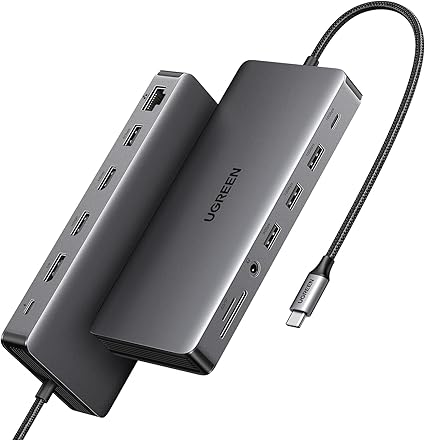
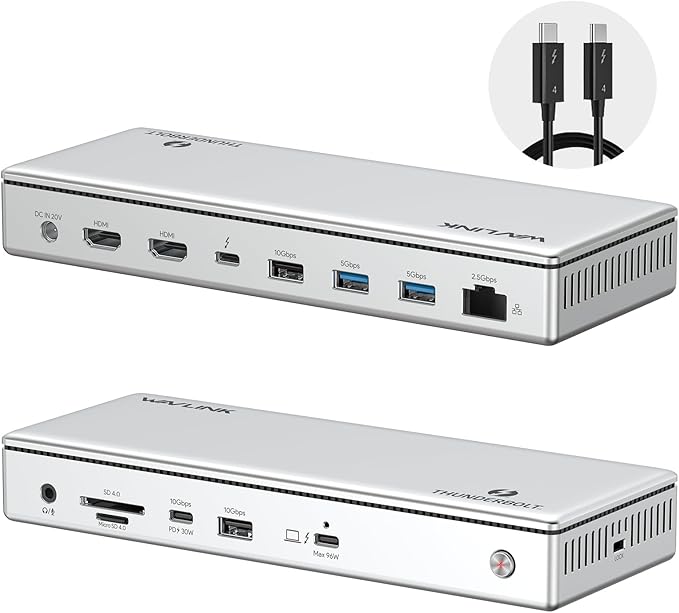
UGREEN Dock & Stand for Mac mini M4/ M4 Pro with NVMe SSD Enclosure, 3 USB A 10Gbps, USB C Data Port, SD Card Reader, Silver
Buyers photos 1
Dynamics of prices
Now more cheaper that usual by 99%

Want to know when the price of this product will come down? Click "Follow the price" and we'll let you know!
Characteristics
Description
Massive 8TB Expandable Storage: Unlock the full potential of your Mac Mini M4 with up to 8TB of ultra-fast internal storage. The dock supports M.2 NVMe SSDs (2230/2242/2260/2280 sizes). Enjoy blazing 10Gbps transfer speeds for large files, 4K editing, or backups—all while keeping your setup sleek and clutter-free. (SSD not included.) 11-in-1 High-Speed Connectivity Hub: Turn your Mac Mini into a workstation with 11 versatile ports, including 3× USB-A 3.2 (10Gbps), 2× USB-A 3.0 (5Gbps), 2× USB-C 3.2 (10Gbps), and a UHS-II SD/TF card reader (170MB/s). Flexible power options: Draws power from your Mac Mini or use an external adapter (recommended for multi-device setups). 10Gbps Data Transfer: Enjoy blazing 10Gbps transfer speeds for large files, 4K editing, or backups—all while keeping your setup sleek and clutter-free. (SSD not included.) Precision-Engineered for Mac Mini M4:Designed to perfectly match your Mac Mini’s curves, this dock blends seamlessly while adding functionality. Features include a bottom-groove power button (turn on your Mac without lifting it) and anti-slip silicone pads for stability and scratch protection. Effortless Setup & Tidy Workspace:The included 4cm short cable keeps your desk neat, while the compact design maximizes space. Whether you’re a creative pro or a multitasker, this hub delivers storage, speed, and connectivity in one elegant solution.
Product reviews 3
Buyers photos 1

Todd Stevenson
I've been happy with the quality of the product but am most unhappy about the supporting documentation. There were four items that were not documented, making it very difficult to set up the device. I had to search YouTube videos and send UGreen emails to get the questions answered. These items should have been in the basic documentation. They are:* What is the foam pad used for that came with the device? I guessed it was to be used with the SSD but since the documentation didn't say anything at all, I had to search around to find an answer. Finally I found out it was a heat sync to be placed on top of the SSD card.* Which USB port on the Mac Mini should I plug in the docking station? Maybe this is obvious to a lot of people but it wasn't explained in the documentation. The picture in the documentation showed it was plugged into the middle port on the Mac Mini, but nothing was explained. When I set up the docking station originally, I plugged it into the left USB port. Some features worked, others didn't. This required several emails to UGreen to get that fixed.* Under what conditions does the docking station required input power? There were just vague references to the fact that input power may be required in certain situations. When I added the SSD card I figured out from YouTube and Google that the input power was required.* What type of SSD is supported? I purchased a SATA SSD device and it didn't work. Through google and reading the 2 point font technical specification I found that it required an NVMe device. The installation instructions for the SSD should have mentioned this. I'm a neophyte with these SSDs and didn't know there were multiple incompatible types on the market, both of which fit in the slot. Again a couple of days of emails and google searches to figure this one out.I gave this 4 stars because the device is working as advertised. It just took be 10 days (between emails etc.) to get it set up when it should have only taken 30 minutes.
J. Barbour
Adds a few extra ports for the new M4 Mac Mini for a fair price. The front USB type A ports are very handy along with the front mounted SD card slots. The rear has even more ports. I liked it so much I got one for my wife as well. It looks and feels like an Apple product and fits perfectly under my M4 Mac Mini, well done UGreen. One nice thing is that it doesn't appear to affect the Wi-Fi connection as some reviews have suggested.
John Lehmann
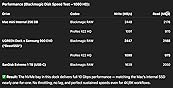
When I bought my new Mac mini M4, I intentionally chose the base 256 GB SSD model to save money, knowing I could expand storage externally. After testing several hubs, this UGREEN Dock & Stand for Mac mini M4 turned out to be the perfect solution — combining style, speed, and practicality.Setup was simple: I installed a Samsung 990 EVO Plus 1 TB NVMe SSD (available here on Amazon:https://www.amazon.com/dp/B0DHLFWBQ1) in the built-in enclosure and connected it to one of the rear Thunderbolt ports. It was instantly recognized with no setup needed. The Mini sits neatly on top of the dock, keeping my workspace clean and cable management effortless.Performance (Blackmagic Disk Speed Test – 1080 HD):Mac mini Internal (256 GB)- Blackmagic RAW: 2448 MB/s write / 2176 MB/s read- ProRes 422 HQ: 1091 MB/s write / 970 MB/s readUGREEN Dock Samsung 990 EVO Plus 1 TB ("BeastSSD")- Blackmagic RAW: 2447 MB/s write / 2188 MB/s read- ProRes 422 HQ: 1090 MB/s write / 975 MB/s readSanDisk Extreme 1 TB (Front USB-C)- Blackmagic RAW: 1639 MB/s write / 2050 MB/s read- ProRes 422 HQ: 730 MB/s write / 914 MB/s read✅ Result: The UGREEN dock’s NVMe bay matches the Mac mini’s internal SSD performance almost exactly — no throttling, no lag, just full-speed throughput.Why this setup makes sense:Instead of paying Apple’s premium for a larger internal SSD, I invested in this dock and a high-performance NVMe drive. The result: triple the storage and full-speed performance for a fraction of the cost.⭐ 5/5 — A smart, powerful, and elegant upgrade for any Mac mini M4 owner.If you’re buying the base-storage Mac mini, this dock is the must-have companion.
Similar products